

Indexes are critical for keeping queries fast as your data grows. With only a few hundred documents in your local database, every query is fast, with or without indexes. With 100 million documents in a collection, a query that has to scan the entire collection can take seconds or minutes, and slow down other queries by tying up CPU and memory. This guide explains what indexes are, when you should and should not add them, how to define indexes in Mongoose, and how to manage and inspect indexes in production.
- What is an Index?
- When to Add Indexes
- When Not to Add Indexes
- Defining Indexes in Mongoose Schemas
- The
autoIndexOption - Creating Indexes
- Syncing Indexes
- Using
explain()andhint()
What is an Index?
An index is a data structure that stores the values of one or more fields in sorted order, along with a pointer to the document each value came from. Without an index, MongoDB must perform a collection scan: read every document in the collection to find the ones that match your query. With an index, MongoDB can jump directly to the matching values, like how you would use the index at the back of a textbook rather than reading every page. You can think of an index as precomputing the result of a particular query.
For example, suppose you have a User model and you frequently look up users by email.
const userSchema = new Schema({
  name: String,
  email: String
});
userSchema.index({ email: 1 });
const User = mongoose.model('User', userSchema);

// With the `email` index, MongoDB finds this user without scanning every document
await User.findOne({ email: 'hermione@hogwarts.edu' });
The 1 in { email: 1 } means the index is sorted in ascending order, and -1 means descending order.
For a single-field index, the direction does not matter, because MongoDB can traverse the index in either direction.
MongoDB automatically creates a unique index on _id for every normal collection, so queries by _id, like findById(), always use an index.
You cannot drop the _id index.
The exception is timeseries collections, which do not have an _id index.
Compound Indexes
A compound index is an index on multiple fields.
Consider an Order model for an online store, where the most common query is "show a customer's most recent orders."
const orderSchema = new Schema({
  customerId: mongoose.ObjectId,
  status: String, // 'pending', 'shipped', 'delivered', or 'cancelled'
  isGift: Boolean,
  total: Number,
  createdAt: Date
});
orderSchema.index({ customerId: 1, createdAt: -1 });
const Order = mongoose.model('Order', orderSchema);

await Order.find({ customerId }).sort({ createdAt: -1 }).limit(10);
A compound index sorts by the first field, then by the second field within each value of the first field, and so on.
So the { customerId: 1, createdAt: -1 } index groups all of a customer's orders together, already sorted from newest to oldest.
MongoDB can answer the above query by reading the first 10 index entries for that customer, without sorting any documents in memory.
Field order matters in compound indexes.
A compound index can support queries on any prefix of its fields.
The { customerId: 1, createdAt: -1 } index supports queries on customerId alone, and on customerId and createdAt together, but not queries on createdAt alone.
// Can use the `{ customerId: 1, createdAt: -1 }` index
await Order.find({ customerId });
await Order.find({ customerId, createdAt: { $gte: lastWeek } });

// Cannot use the `{ customerId: 1, createdAt: -1 }` index efficiently,
// because `createdAt` is not a prefix of the index
await Order.find({ createdAt: { $gte: lastWeek } });
Unique Indexes
A unique index is an index which also ensures there are no duplicate values within the index.
For example, MongoDB collections always have a unique index on _id.
Trying to insert two documents with the same _id property throws an error with err.code === 11000.
const _id = new mongoose.Types.ObjectId();

await Order.create({ _id });

const err = await Order.create({ _id }).then(() => null, err => err);
err.code; // 11000, MongoDB's error code for a duplicate key error
err.name; // "MongoServerError"
err.message; // "E11000 duplicate key error..."
unique is an index option.
When defining an index, pass unique: true to indicate the index should be unique.
userSchema.index({ email: 1 }, { unique: true });If you build a unique index on a collection which already has duplicate emails, the index build will fail.
For example, if there are already two users with email bill@microsoft.com, the above index will fail to build with an E11000 duplicate key error.
You cannot have a unique and a non-unique index on the same fields.
If you already have a non-unique index on { email: 1 }, building an index with { email: 1 } and unique: true will fail with an IndexKeySpecsConflict error.
Unique indexes count missing and null fields as a distinct value by default.
In other words, if you have a unique index on email, you will get a duplicate key error if you try to insert 2 users with no email or email: null.
// Create a user with no email
await User.create({});

// Throws duplicate key error for `email`
await User.create({});

// Also duplicate key error for `email`: missing and `null` are considered
// equivalent for unique indexes.
await User.create({ email: null });
To work around this, you should create a partial unique index.
Indexes have a partialFilterExpression option which limits the documents the index applies to.
For example, the following index indicates that email should be unique only if the email property is set and not null.
userSchema.index(
  { email: 1 },
  {
    unique: true,
    // Unique index only applies to documents that have an `email` property.
    partialFilterExpression: {
      email: { $exists: true, $ne: null }
    }
  }
);
A unique compound index enforces uniqueness on the combination of its fields, not on each field individually.
For example, a unique index on { email: 1, workspace: 1 } allows multiple users with the same email, as long as each of those users has a different workspace.
userSchema.index({ email: 1, workspace: 1 }, { unique: true });

await User.create({ email: 'hermione@hogwarts.edu', workspace: 'gryffindor' });
// OK: same `email`, different `workspace`
await User.create({ email: 'hermione@hogwarts.edu', workspace: 'ravenclaw' });
// OK: same `workspace`, different `email`
await User.create({ email: 'ron@hogwarts.edu', workspace: 'gryffindor' });
// Throws duplicate key error: same `email` and `workspace`
await User.create({ email: 'hermione@hogwarts.edu', workspace: 'gryffindor' });
The order of fields in a unique compound index (or order of fields in the document) does not affect which documents count as duplicates.
When to Add Indexes
You do not need an index for every query from day one. Collection scans are cheap on small collections: scanning a few thousand documents typically takes a few milliseconds. As a rule of thumb, by the time a collection grows to 10,000 documents, you should have indexes for your most common queries.
Not every index is a good index.
The value of an index depends on its selectivity: how much the index narrows down the set of documents MongoDB needs to examine.
For example, if you have a { customerId: 1 } index on the Order model, and you run a query for Order.find({ customerId, isGift: true }), MongoDB would use the index to find every order that belongs to customerId.
The index only contains customerId, so MongoDB then has to load each of those orders from the collection and check whether isGift is true.
The documents MongoDB loads and checks against your query filter are the documents examined (sometimes called documents scanned).
// Suppose this customer has 25 orders, 3 of which are gifts.
// With a `{ customerId: 1 }` index, MongoDB examines 25 documents and returns 3.
// Without any index, MongoDB examines every document in the collection and returns 3.
await Order.find({ customerId, isGift: true });
The number of documents examined, not the number of documents returned, is what determines how much work a query does. Both versions of the above query return the same 3 orders, but without an index, MongoDB has to examine every order in the collection to find them. A good index keeps the number of documents examined small relative to the size of the collection: examining 25 documents to return 3 is typically fine, examining 5 million documents to return 3 is not.
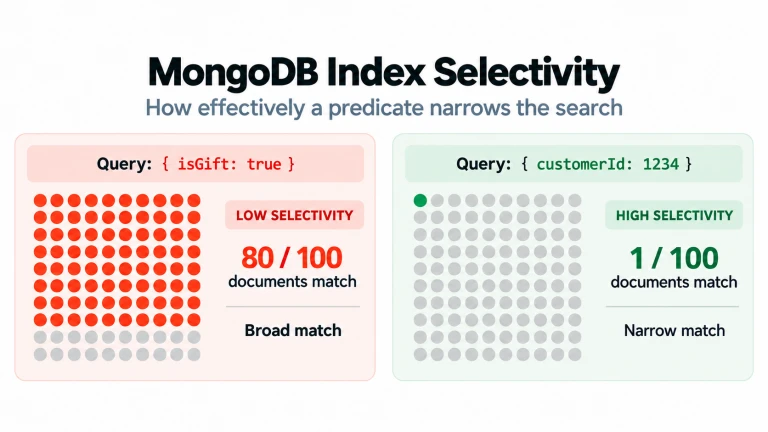
Now consider an index on isGift in the Order model.
If roughly half of all orders are gifts, then the number of documents that match any given value of isGift is not meaningfully smaller than the number of documents in the whole collection.
A query for { isGift: true } still has to examine half the collection, and loading half the collection's documents through an index can even be slower than a collection scan.
That means an index on isGift is a bad index.
In contrast, customerId is highly selective.
If your store has 5 million orders from 200,000 customers, the average customer has 25 orders, so a query on customerId examines on average 25 documents instead of 5 million.
| Index | Example Query | Documents Examined (of 5M) |
|---|---|---|
| None | { customerId } |
~5,000,000 |
{ isGift: 1 } |
{ isGift: true } |
~2,500,000 |
{ customerId: 1 } |
{ customerId } |
~25 |
Low-selectivity fields are not useless; they just should not be indexed on their own.
A low-selectivity field can still be helpful as part of a compound index, although put low-selectivity fields later in the compound index. A { customerId: 1, isGift: 1 } index is also better than an { isGift: 1, customerId: 1 } index, even though both examine the same 3 documents for a query on { customerId, isGift }.
That's because compound indexes can only support queries on a prefix of its fields.
Because customerId comes first, { customerId: 1, isGift: 1 } also supports queries on customerId alone, like loading all of a customer's orders, so it can replace a { customerId: 1 } index entirely.
On the other hand, the prefix of { isGift: 1, customerId: 1 } is { isGift: 1 }, which is not useful on its own.
When Not to Add Indexes
If indexes make queries faster, why not index everything? Each index comes with overhead for writes, and if indexes take up more space than available memory they become significantly slower.
Write Overhead
Every index is a separate data structure that MongoDB must keep in sync with your documents. When you insert or delete a document, MongoDB must update every index on the collection. When you update a document, MongoDB must update every index that includes a modified field. If you only have a few indexes, the overhead is negligible. But the overhead adds up if you have an extremely write-heavy collection with dozens of indexes. MongoDB also has a hard limit of 64 indexes per collection.
Memory
Indexes are most effective when they fit in RAM.
The idea is that, for larger collections, the entire collection may be too large to fit into RAM, but a subsection of commonly queried small fields may still fit into RAM.
MongoDB's storage engine keeps frequently used indexes and documents in an in-memory cache; if your indexes do not fit, MongoDB has to read index data from disk, and indexed queries become significantly slower.
Every unnecessary index competes for cache space with the indexes and documents your application actually uses.
You can check the size of a collection's indexes using the $collStats aggregation stage.
const stats = await Order.aggregate([{ $collStats: { storageStats: {} } }]);
const totalIndexSize = stats.reduce((total, { storageStats }) => total + storageStats.totalIndexSize, 0);
const indexSizes = {};
for (const { storageStats } of stats) {
  for (const [name, size] of Object.entries(storageStats.indexSizes)) {
    indexSizes[name] = (indexSizes[name] || 0) + size;
  }
}
totalIndexSize; // Total size of all indexes across all returned shards, in bytes
indexSizes; // Total size of each index across all returned shards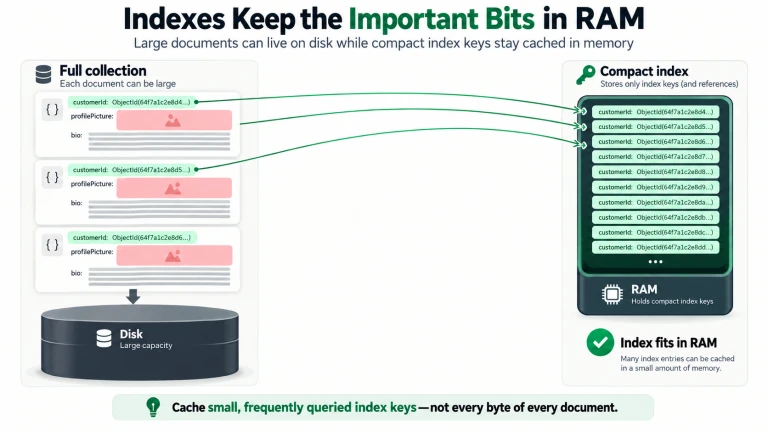
Overlapping Indexes
Multiple indexes that each cover part of a query make it harder for MongoDB to answer that query efficiently.
Suppose you have separate { customerId: 1 } and { status: 1 } indexes, and you query for { customerId, status: 'shipped' }.
No single index covers both fields, so it's up to MongoDB to choose which index to use.
While MongoDB is smart about selecting the right index, overlapping indexes often mean you're better off with a compound index - in the above example, you're better off having an index on { customerId, status } than separate customerId and status indexes.
Similarly, an index that is a prefix of another index is typically redundant.
If you have a { customerId: 1, createdAt: -1 } index, you do not need a separate { customerId: 1 } index.
MongoDB can use the { customerId: 1, createdAt: -1 } index for queries on customerId that do not use createdAt.
Recommendations by Collection Size
Below are some rough heuristics we use when thinking about what indexes a collection needs based on collection size. Index needs depend heavily on workload, document size, application structure, and business needs, so treat these heuristics as a "finger in the wind" rather than exact evidence-based boundaries.
- Tiny collections (fewer than 10,000 documents): Don't worry too much about indexes. Collection scans on tiny collections are fast because there are few documents and tiny collections often fit into available RAM.
- Small collections (10,000 to 1 million documents): Add indexes to cover your common queries is important but not critical - you can get away with infrequent collection scans. The risk of having too many indexes is low, so overindexing is not a major concern.
- Large collections (1 million to 100 million documents): Ensuring index coverage for common queries is critical. Frequent collection scans or even scans over insufficiently selective indexes can overload the database. The risk of having too many indexes is moderate, so be careful about overindexing, but it is more important to avoid index misses.
- Extra large collections (100 million documents or more): Ensuring index coverage for common queries is critical. Even occasional collection scans can cause significant performance degradation. The risk of overindexing is also high: indexes on XL collections take a lot of RAM, and XL collections are typically write-heavy. Make heavy use of the
_idindex, because that index exists regardless.
For example, the default _id is an ObjectId, and when you create a new ObjectId() with no parameters, the resulting ObjectId encodes the time the ObjectId was created.
You can query and sort by _id instead of adding a separate index on createdAt, presuming you use the default ObjectId constructor.
This is a helpful trick for large and extra large collections, or cases where you're building a generic tool that does not know the collection size.
const objectId = new mongoose.Types.ObjectId();
// time when `new ObjectId()` was called as a native JS Date.
console.log(objectId.getTimestamp());

// Find all orders created in the last 24 hours using the `_id` index
// Keep in mind that `ObjectId.createFromTime()` takes _seconds_ since the
// UNIX epoch as a parameter, whereas `Date.now()` returns _milliseconds_
// since the UNIX epoch. Make sure to divide by 1000!
const oneDayAgo = Math.floor(Date.now() / 1000) - 24 * 60 * 60;
await Order.
  find({ _id: { $gte: mongoose.Types.ObjectId.createFromTime(oneDayAgo) } }).
  sort({ _id: -1 });
Defining Indexes in Mongoose Schemas
Mongoose lets you define indexes at the path level using schema type options like index, unique, and sparse.
const userSchema = new Schema({
  email: { type: String, unique: true }, // Unique index on `email`
  username: { type: String, index: true }, // Non-unique index on `username`
  lastLoginAt: Date
});
Best Practice:
We recommend defining all indexes explicitly using Schema.prototype.index() rather than path-level index options.
Path-level options can be convenient for small schemas and examples, but they don't allow defining compound indexes, and they scatter your index definitions throughout your schema.
const userSchema = new Schema({
  email: String,
  username: String,
  lastLoginAt: Date
});

userSchema.index({ email: 1 }, { unique: true });
userSchema.index({ username: 1 });
userSchema.index({ username: 1, lastLoginAt: -1 });
Putting all indexes in the same place makes it easy to see every index on a collection at a glance.
It also helps with spotting overlapping or redundant indexes, like the { username: 1 } index above, which is a prefix of { username: 1, lastLoginAt: -1 }.
Compound indexes must be defined using Schema.prototype.index(), so using index() for all indexes is also more consistent.
Best Practice: We recommend defining every index in your Mongoose schemas and using Mongoose to manage your indexes in production. Even if you do not use Mongoose to build indexes, we still recommend listing your indexes in your schemas. Defining indexes in your schemas gives your codebase a record of which indexes are available, without needing to connect to the database. This is extremely valuable context for both humans and coding agents: a developer reviewing a pull request, or a coding agent writing a new query, can verify whether the query misses an index by reading the code.
The autoIndex Option
By default, when you create a model using mongoose.model() or Connection.prototype.model(), Mongoose calls Model.init(), which calls createIndex() for every index defined in your schema.
This behavior is controlled by the autoIndex option.
There are a few important details about how autoIndex works:
createIndex()is a no-op if an identical index already exists, so restarting your application does not rebuild existing indexes.autoIndexonly creates indexes, it never drops them. Removing an index from your schema does not remove the index from MongoDB.- If building an index fails, such as adding a unique index on a field with duplicate values or building an index that conflicts with an existing index, Mongoose emits an
'index'event on the model with the error. Your application keeps running without that index. - Mongoose does not wait for
autoIndexto complete before allowing database operations.autoIndexis meant to run in the background: your application can still execute queries while Mongoose is building indexes. You can callModel.init()to wait for the index build to finish.
Best Practice:
We recommend enabling autoIndex in development and disabling it in production.
This recommendation is particularly important for large and extra large collections (1M).
mongoose.set('autoIndex', process.env.NODE_ENV !== 'production');The risk of using autoIndex in production is minimal for small collections (under 1M documents).
However, there are risks when using autoIndex with larger collections:
- Building an index on a large collection can take minutes or even hours, and can consume large amounts of CPU and disk I/O.
- Mongoose does not throw an error by default if an
autoIndexindex build fails. If you ship a new feature that relies on a new index, andautoIndexfails to build that index, you may cause serious performance issues. - Mongoose models are typically created when your application starts, so every time your application starts, Mongoose sends a
createIndex()command for every index in your schemas. Creating an index that already exists is a fast no-op, but the commands add up: if you have many indexes and many application servers restarting at once, for example during a deployment or a crash loop, your application can send thousands ofcreateIndex()commands to MongoDB in rapid succession and degrade database performance.
Instead of relying on autoIndex, we recommend either building indexes from one-off scripts or through a GUI like Mongoose Studio or MongoDB Atlas.
Detecting autoIndex Errors
Because autoIndex runs in the background, index build errors do not show up in your application's normal error handling.
If you use autoIndex, there are two ways to find out whether an index build failed: await Model.init() and the 'index' event.
Model.init() returns a promise that resolves when Mongoose has finished initializing the model, and rejects if initializing the model failed.
If autoIndex is set, automatic index builds are part of the model initialization process.
Calling init() does not trigger an index build: Mongoose already called init() when you created the model, so init() returns the existing promise.
Calling Model.init() multiple times returns the exact same promise instance (Model.init() === Model.init() is true).
const userSchema = new Schema({ email: String, username: String });
userSchema.index({ email: 1 }, { unique: true });
userSchema.index({ username: 1 });
const User = mongoose.model('User', userSchema);

try {
  await User.init();
} catch (err) {
  // If the `users` collection has duplicate emails, `err.code` is 11000 and
  // `err.message` is "Index build failed: ... E11000 duplicate key error ..."
}
Mongoose also emits an 'index' event on the model when it has finished building indexes.
Mongoose does not emit an 'index' event on models if autoIndex is disabled, unless Model.createIndexes() or Model.ensureIndexes() is called.
If an index build failed, the event handler receives the error.
Make sure you register the event handler immediately after creating the model: if you register it after Mongoose has finished building indexes, the handler never runs.
const User = mongoose.model('User', userSchema);

User.on('index', err => {
  if (err != null) {
    console.error('Failed to build indexes for User', err);
  }
});
One failed index build does not stop Mongoose from building the remaining indexes.
In the above example, if the { email: 1 } index fails to build, Mongoose still builds the { username: 1 } index.
However, init() and the 'index' event only report the first error.
To track each index build individually, use the 'index-single-start' and 'index-single-done' events.
Mongoose builds indexes one at a time, and emits 'index-single-start' before calling createIndex() and 'index-single-done' after createIndex() succeeds or fails.
These events are useful for logging every failed index build, and for logging how long each index takes to build.
let startTime = null;
User.on('index-single-start', fields => {
  startTime = Date.now();
  console.log('Building index', fields);
});
User.on('index-single-done', (err, fields, options, name) => {
  const elapsedMS = Date.now() - startTime;
  if (err != null) {
    console.error('Failed to build index', fields, options, 'after', elapsedMS, 'ms', err);
  } else {
    console.log('Built index', name, 'in', elapsedMS, 'ms');
  }
});
Mongoose emits all of the above events when you call Model.createIndexes() or Model.syncIndexes() yourself, not just with autoIndex, so you can also use these events to log progress in one-off index build scripts.
Creating Indexes
Model.createIndexes() calls createIndex() for every index defined in the model's schema.
createIndexes() uses the same logic as autoIndex: when autoIndex is enabled, Model.init() builds indexes the same way createIndexes() does.
So the details from the autoIndex section also apply to createIndexes():
createIndexes()is a no-op for indexes that already exist with the same options.createIndexes()only creates indexes, it never drops them.createIndexes()builds indexes one at a time. If one index fails to build,createIndexes()still builds the remaining indexes.
The difference is that createIndexes() only runs when you call it, and it builds indexes even if autoIndex is disabled.
createIndexes() returns a promise that resolves when every index has been built, or rejects with the first error if any index build failed.
createIndexes() never drops indexes, which has tradeoffs.
On one hand, it can never unintentionally drop an index that your application relies on.
However, createIndexes() also never removes indexes you no longer need, or rebuilds indexes whose options changed: if an index with the same name already exists with different options, that index build fails with an error.
To handle these cases, use syncIndexes().
Syncing Indexes
Mongoose also has a Model.syncIndexes() function that makes the indexes in MongoDB match the indexes in your schema.
Unlike createIndexes(), syncIndexes() both creates indexes that are missing from MongoDB and drops indexes that are not in your schema (except the _id index).
You can also call Connection.prototype.syncIndexes() to sync indexes for every model on a connection.
autoIndex |
createIndexes() |
syncIndexes() |
|
|---|---|---|---|
| Creates indexes | Yes | Yes | Yes |
| Drops indexes | No | No | Yes |
| When it runs | Automatically on init() |
Only when you call it | Only when you call it |
Dropping indexes makes syncIndexes() significantly riskier than autoIndex.
If syncIndexes() drops an index that a common query depends on, that query falls back to a collection scan.
Best Practice:
Because of the risk of dropping an index is so high, we strongly recommend you do not run syncIndexes() without human review.
In particular, we recommend against running syncIndexes() application start in production.
Instead, use Model.diffIndexes() to do a dry run, and have a human review the result before calling syncIndexes().
const { toDrop, toCreate } = await Order.diffIndexes();
toDrop; // [ 'isGift_1' ]
toCreate; // [ { status: 1, createdAt: -1 } ]

// After reviewing `toDrop` and `toCreate`
await Order.syncIndexes();
If you are unsure whether an index is still needed, you can pass the hideIndexes option to hide indexes rather than dropping them.
MongoDB keeps hidden indexes up to date but does not use them for queries, so you can quickly unhide an index if performance regresses.
await Order.syncIndexes({ hideIndexes: true });Mongoose Studio, the Mongoose team's open source MongoDB GUI, provides a convenient GUI around syncIndexes() that lets you review which indexes will be created and dropped before applying changes.
Using explain() and hint()
To check which index a query uses, call Query.prototype.explain().
Passing 'executionStats' tells MongoDB to execute the query and report how much work it did.
The following example inserts 10 orders into a collection with a { customerId: 1, status: 1 } index, and then explains a query for one customer's shipped orders.
const orderSchema = new mongoose.Schema({
  customerId: mongoose.ObjectId,
  status: String, // 'pending', 'shipped', 'delivered', or 'cancelled'
  isGift: Boolean
});
orderSchema.index({ customerId: 1, status: 1 });
const Order = mongoose.model('Order', orderSchema);

// Explicitly build the `{ customerId: 1, status: 1 }` index, even with `autoIndex` disabled
await Order.createIndexes();

// Insert 10 orders: 6 orders for `customerId`, and 4 orders for `otherCustomerId`
const customerId = new mongoose.Types.ObjectId();
const otherCustomerId = new mongoose.Types.ObjectId();
await Order.insertMany([
  { customerId, status: 'shipped', isGift: true },
  { customerId, status: 'shipped', isGift: false },
  { customerId, status: 'pending', isGift: true },
  { customerId, status: 'delivered', isGift: false },
  { customerId, status: 'delivered', isGift: true },
  { customerId, status: 'cancelled', isGift: false },
  { customerId: otherCustomerId, status: 'shipped', isGift: true },
  { customerId: otherCustomerId, status: 'pending', isGift: false },
  { customerId: otherCustomerId, status: 'delivered', isGift: false },
  { customerId: otherCustomerId, status: 'shipped', isGift: false }
]);

const explain = await Order.
  find({ customerId, status: 'shipped' }).
  explain('executionStats');

console.log(explain.queryPlanner.winningPlan);
console.log({
  nReturned: explain.executionStats.nReturned,
  totalKeysExamined: explain.executionStats.totalKeysExamined,
  totalDocsExamined: explain.executionStats.totalDocsExamined,
  executionTimeMillis: explain.executionStats.executionTimeMillis
});
The above example prints output similar to the following.
{
  stage: 'FETCH',
  inputStage: {
    stage: 'IXSCAN',
    keyPattern: { customerId: 1, status: 1 },
    indexName: 'customerId_1_status_1',
    // ...
  }
  // ...
}
{
  nReturned: 2,
  totalKeysExamined: 2,
  totalDocsExamined: 2,
  executionTimeMillis: 0
}
queryPlanner.winningPlan describes the plan MongoDB chose to execute the query, as a tree of stages.
Read the tree from the innermost stage outward: MongoDB first runs an IXSCAN (index scan) on the customerId_1_status_1 index to find matching index entries, then a FETCH stage loads the corresponding documents.
If MongoDB had not used an index, the winning plan would instead contain a COLLSCAN (collection scan) stage.
executionStats describes how much work MongoDB did to execute the plan:
nReturned: the number of documents the query returned. This customer has 2 shipped orders.totalKeysExamined: the number of index entries MongoDB read. Because the{ customerId: 1, status: 1 }index contains both fields in the query, MongoDB only read the 2 index entries that match.totalDocsExamined: the number of documents examined, that is, the number of documents MongoDB loaded and checked against the query filter.executionTimeMillis: how long the query took to execute on the server, in milliseconds.
This query is ideal: nReturned, totalKeysExamined, and totalDocsExamined are all equal, which means MongoDB did not read any index entries or documents that it did not return.
For comparison, the following table shows the execution stats for a few other queries against the same collection.
| Query | Winning Plan | totalKeysExamined |
totalDocsExamined |
nReturned |
|---|---|---|---|---|
{ customerId, status: 'shipped' } |
IXSCAN + FETCH |
2 | 2 | 2 |
{ customerId, isGift: true } |
IXSCAN + FETCH |
6 | 6 | 3 |
{ isGift: true } |
COLLSCAN |
0 | 10 | 4 |
The { customerId, isGift: true } query can use the { customerId: 1, status: 1 } index to find the customer's 6 orders, but isGift is not in the index, so MongoDB has to load all 6 orders and filter out the 3 that are not gifts.
That is still reasonably efficient, because the index narrowed the collection down to just this customer's orders.
The { isGift: true } query cannot use the index at all, because isGift is not a prefix of the index, so MongoDB examines every document in the collection.
In general, there are a few things to look for in explain output:
- A
COLLSCANstage on a large collection usually means your query needs an index. - Compare
totalDocsExaminedtonReturned. If MongoDB examined 6 documents to return 3, the index is doing its job. If MongoDB examined 100,000 documents to return 3, the query needs a more selective index. - A
SORTstage means MongoDB had to sort results in memory, which suggests your index does not match your query's sort order.
The exact structure of explain output varies between MongoDB versions, so you may need to look for these stages in nested properties like winningPlan.queryPlan.
MongoDB's query planner usually picks the right index on its own.
In cases where it does not, you can use Query.prototype.hint() to explicitly tell MongoDB which index to use, either by key pattern or by index name.
await Order.
  find({ customerId, status: 'shipped' }).
  hint({ customerId: 1, status: 1 });

// Equivalent
await Order.
  find({ customerId, status: 'shipped' }).
  hint('customerId_1_status_1');
hint() is typically not necessary.
It is most helpful when you have overlapping indexes.
For example, if the Order model had both a { customerId: 1, status: 1 } index and a { status: 1, createdAt: -1 } index, both indexes could support the above query.
Overlapping indexes are often a sign of index design that could be improved, but they may be valid in some cases, for example when different queries depend on each index.
Keep in mind that hint() overrides the query planner: if you hint() an index that does not exist, MongoDB throws an error rather than falling back to another plan.